
Access Controller
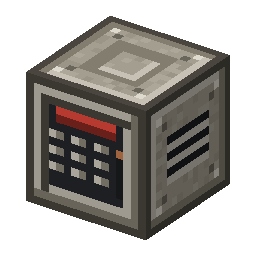
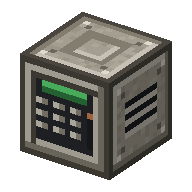
The Access Controller guards a door. A player uses it to ask to come in. Allowed players get a short redstone pulse that opens the door; everyone else is refused. It works on its own, without any program or computer.
How to get it
Section titled “How to get it”


 Access Controller
Set it up
Section titled “Set it up”- Place it next to a door, lamp or other redstone device. Its keypad faces you.
- Sneak and use it with an empty hand to open its form.
- Add players by name with Player name and Allow (they must be online), or switch restricted to public to let everyone in.
- Set Seconds (1 to 30, default 3) and Side, the side it powers:
allor a face such asnorth. Select Save. Test opens it once.
Other players use it with an empty hand. The owner, trusted players and listed players are let in: the light on the keypad turns green and the outputs are powered for the set time. Everyone else hears a low note and sees Access denied. The form lists the last 10 attempts. A new controller starts restricted.
It does not need to be linked to a computer to work. Link it to a Network Repeater when a program should react to visitors.
Drive programs
Section titled “Drive programs”Yes. A drive program can react to attempts and open the door, for example to keep a guest book. See the Door guest book starter. Programs can open and close it and read the list, but they cannot change who is allowed or make it public.
Program API
Section titled “Program API”Getting it
Section titled “Getting it”accessControllers.named(alias)
Refer to an Access Controller by its name. Use it in a constant, then handle its events with on NAME.event(...).
const front_door = accessControllers.named("front_door")accessControllers.from(alias)
Resolve an access controller by name.
door, err = accessControllers.from("front_door")Methods
Section titled “Methods”Properties: front_door.connected, front_door.id, front_door.kind, front_door.name. They are read-only.
front_door.allowed()
List the names of players on the access list.
names = door.allowed()front_door.close()
Turn the outputs off now.
door.close()front_door.isOpen()
True while the outputs are powered.
if door.isOpen() { print("open") }front_door.isPublic()
True when anyone may open the door.
open = door.isPublic()front_door.open()
Power the outputs for the configured number of seconds, as if access was granted.
door.open()front_door.openFor(seconds)
Power the outputs for 1 to 30 seconds.
door.openFor(10)front_door.recent()
List up to 10 recent attempts, newest first, as text.
for line in door.recent() { print(line) }Events
Section titled “Events”| Event | When it runs |
|---|---|
accessAttempted(player) | Runs when a player uses the controller. player has name, uuid and result (Access.GRANTED or Access.DENIED). |
accessGranted(player) | Runs when a player is let in. |
accessDenied(player) | Runs when a player is refused. |
connected | Runs when the device becomes reachable, for example after its area loads. |
disconnected | Runs when the device stops being reachable: unloaded, unlinked or removed. |
programStarted | Runs when the device's own program starts. |
programStopped | Runs when the device's own program stops. |
programFailed(message) | Runs when the device's own program stops on an error. |
Each event’s player is {name, uuid, result, granted}, where result is Access.GRANTED or Access.DENIED.
Limits
Section titled “Limits”- Up to 32 players on the list, by UUID. Only online players can be added; offline players can be removed.
- Only the owner can change the list and the public setting.
- It never changes Minecraft permissions or protects blocks: anyone can still break into a house through a wall.
- A server allows 256 controllers to be open at once; more fail with
access.limit.
Example
Section titled “Example”const front_door = accessControllers.named("front_door")
on front_door.accessDenied(player) { print(player.name + " tried to come in")}